An Opinionated Git Workflow
Software loves to sell the dream of moving fast. Ship value early, test hypotheses, get feedback. Iterate. Sounds glorious until you open your git history. That’s usually where the dream collides with reality: tangled branches, “temporary” merges that never got cleaned up, environments that don’t reflect reality, and a main branch that is anything but the truth.
Over the years, I’ve seen this pattern everywhere: from scrappy startups to giant corporations. Different tech stacks, different cultures, same problems in gitflows. At some point I stopped blaming the tools and started blaming the lack of principles. Let’s begin by looking at the principles that shaped my approach:
Main as the oracle
main is sacred. If it stops being the source of truth, we start doubting ourselves and our code. Imagine a feature that alters critical flows leaking into production before it’s properly deployed. Someone has to manage this at some point manually but we are humans: we make mistakes!
When main isn’t the oracle, even small mistakes cascade. Responsibility is high, but it’s also the backbone of trust in fast development. The principle is non-negotiable: If someone asks what’s running in production, the answer should always be: look at the principal branch.
Branches as environments
In modern organizations, especially those with microservices, running hundreds of services locally to test changes is often impossible. You must trust that each squad is doing its job, and your responsibility is limited: ensure your changes work correctly in the shared environments and keep them stable. Branches are more than organizational tools; they define contractual boundaries.
This isn’t just a technical guideline: it builds culture. By enforcing respect for these boundaries, teams learn accountability, trust, and a shared sense of ownership. A healthy workflow encourages developers to think beyond their own feature, fostering collaboration and reliability across the organization. Branches are free use them! Spin one up for every environment you can think of. It’s like giving each feature its own sandbox.
Never merge environment branches
I learned this the hard way with a mobile app. One feature slipped through and tried to run as soon as the app launched, but it wasn’t fully deployed in production yet. The app crashed right after the splash screen. Users couldn’t get in, trust in the app took a hit, and the team spent hours rolling back the release and cherry-picking commits one by one. The frustration was real, for both users and developers.
Why do teams still merge environment branches? Because old habits die hard. Many grew up on Gitflow, trying to mimic waterfall-style processes, and some pipelines even encourage merging staging into production branches. While understandable, these habits often introduce errors and unnecessary complexity*.*
Merging branches from different environments often creates conflicts, and they don’t always come from the feature you’re trying to release. It blurs responsibility and nobody can be completely sure which change actually caused the problem. Developers can end up spending time fixing issues that may not even be part of their scope, slowing down the release and adding unnecessary complexity.
The takeaway is simple: keep environment branches independent and let main or release be the single source of truth. Conflicts should happen naturally, only where they belong and closely tied to the feature being released.
Features always from main
All new features should start from main. It keeps the source of truth clear and ensures every change is grounded in production-ready code.
Sometimes a new feature depends on another feature that hasn’t been released yet. In that case, the unreleased feature branch becomes the base for subsequent work. This makes the workflow recursive: every dependent feature builds on the correct foundation without merging unrelated changes.
main
 │
 ├─ Feature A
 │
 ├─ Feature B
     │
     └─ Feature C (depends on B)
       │
       └─ Feature D (depends on C)
The pull/merge requests order would be: D → C = C’. Then C’ → B = B’ and finally B’ → main.
Release rhythm: Fast vs slow repos
Not all repositories move at the same speed. Some can be deployed multiple times per day, while others require a slower, more deliberate process. Understanding this difference helps teams structure branches, PRs, and releases strategies appropriately.
Fast release repositories, like backends or web apps, are a playground for speed. Features can be hidden behind flags or versioned endpoints, and can be deployed multiple times per day. In these cases the commit history often reflects individual feature commits:
The main commit history might look like this:
Feature A
Feature B
Feature C
Slow release repositories, like mobile apps, follow a longer loop. Each release goes through store reviews, user updates, and other constraints. Here, a release branch can act as a temporary oracle. When merged into main, commits are often squashed into release-level commits:
The main commit history might look like this:
Release 1.1
Release 1.0
Release 0.2
Merge everything with squash at the feature level.
Each feature, whether a small tweak or a bigger change, becomes a single commit in main or release. This keeps the commit history clean and readable, shows exactly which features are included, and makes rollbacks simple.
For example, in a fast-release repository, if a problem arises in a feature, you can roll back just that feature and leave everything else untouched. In a slow-release repository, if a problem occurs in a feature within a release, you can remove only that feature from the release, rollback the previous release and redeploy. This allows you to fix issues without delaying the entire release, which is a very powerful advantage.
This distinction ensures clarity. Fast repositories show granular feature-level progress, while slow repositories reflect versioned, consolidated releases. Teams can glance at the branch history and immediately understand what it represents.
Alright, let’s talk about the workflow
Let’s imagine a typical Gitflow scenario: three environments: QA, Staging, and Production.
- Feature A is developed and submitted as a PR to QA. It passes tests, merges into QA, and is then deployed to Staging.
- Feature B is developed in parallel, also goes through QA, passes tests, and is deployed to Staging.
At first glance, everything seems fine… but problems arise when changes aren’t linear:
Suppose that due to shifting priorities, Feature A needs design adjustments but Feature B is waiting for release. Now, if we were forced to deploy Staging to Production, someone would have to carefully rollback the leftover commits from Feature A, crossing fingers that nothing breaks. In short, the integrity of Staging breaks when multiple features converge without isolation. Developers may validate their individual features, but there’s no guarantee that the shared environment reflects only what should be there.
How we handle it with our workflow
If, instead, each developer creates a PR to QA first:
Each feature is first refined and validated in a controlled environment, completely independent from other features. QA ensures standards are met, tests pass, and edge cases are covered.
Any fixes or changes resulting from the PR are made directly in the feature branch and the PR is updated accordingly. This process can happen as many times as needed. Under no circumstances should fixes be applied directly to the environment branch. Once the feature is approved, the developer merges the feature branch into Staging, sometimes without a formal PR, for a longer trial period where it integrates with other validated features to ensure everything works smoothly.
The real benefit shows up at the very end: even if Feature A receives last-minute design changes, Feature B remains intact in its own branch. This means the PR pointing to main will end up being much simpler: there’s no leftover code mixed in, conflicts are minimal, and each feature can be deployed independently and safely.
This preserves main as the oracle—the single source of truth in production without contamination or risk from cross-feature merges.
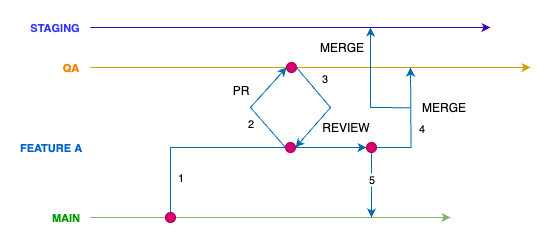
Each red dot keeps its code fully isolated from other branches.
And what is all this about?
At the end of the day, a git workflow is more than a set of rules; it is a culture. Respecting main as the oracle, keeping environment branches independent, and carefully managing feature dependencies helps teams take ownership and communicate clearly. It reduces friction, prevents surprises, and makes releases predictable. Less complexity means fewer mistakes, less firefighting, and more time to focus on building value. These principles scale from a small startup to a giant organization, letting developers move fast without losing control.